If this blog helped you in any way, please donate a dollar here

Showing posts with label computers. Show all posts

Wednesday, May 17, 2023

Share mouse keyboard between Mac and Windows without KVM

Here's a problem that really got me flustered for some time. I was using a Mac OSX Ventura (13.x) from work and also a personal Windows 11 but I wanted to use them at the same time - when I'm taking a break from work - for example. However I wasn't aware of how to get my input streamed to both of them and switch between then whenever I like. After a lot of research I was able to find something that worked and that was free and open source!

I could have bought a KVM switch, but why spend money when technology and FOSS can solve my problem.

Tuesday, March 15, 2022

share keyboard mouse across 2 or more laptops

 In my last work place - ClearedIn, I had a strange problem of having too many laptops. Initially I started off working on a beautiful Acer Laptop (Aspire 5) with Windows 10 installed but then soon realized the laptop is of no use when doing a lot of computation tasks, i.e., joining a video call on teams when chatting on slack and simultaneously working on code. So I got another laptop - hp Pavilion this time, which was way better than the Acer one. However now I had a problem, I had 2 laptops and I wanted to use both at the same time.

I was using 2 keyboards and 2 mice. It was a pretty messy situation, but I did feel very important! Now when I had to take a break on my personal laptop, which is by the way a Lenovo Thinkpad p52 running Windows, I had another set of keyboard and mouse. Now don't forget the monitors too. I was in a mess.

Thursday, April 15, 2021

Microsoft Windows Linux

Linux on Windows

It's 2021 and we've seen the world-wide COVID-19 pandemic.. and now I discovered Windows Sub-system for Linux, yes, Windows support for Linux. Guess it took a global pandemic for Microsoft to get Linux run on Windows!

Well, it's not really Linux, and for purists, this is more of an emulation, kind of like docker, but for Windows. However it feels fast and almost native. Good enough to support most user-mode programming languages out there. The support started from Windows 10 version 20262, so to get started, install Windows 10 and keep upgrading until this version is reached.

Saturday, July 27, 2019

The Techgig C Skill Test

I used to consider myself to be pretty good in C, so I decided to try out the world's biggest programming contest platform, TechGiG (Look here: https://www.techgig.com), or so they claim to be. I wonder why I hadn't dabbled in this platform all this years since the platform seems to be existing for quite some time now. I do remember some 5-6 years ago I had dabbled a bit in the website and then stopped, I wonder why, can't really recall.

So I decided to give it a spin. I decided to try out the TechGig Skill test. Here's what I found while attempting the test.

There were 25 questions and I got 6 wrong and 19 correct. I wonder which ones I got wrong. Also considering some multiple choice answers didn't really answer the question. Also, I really wonder what a Java Question was doing in a C Skill test! Take a look:


Being the Java n00b, I might have messed that up. Moving on to one of the brilliant CHTML Questions in recent times.


That's an amazing blend of HTML and C. Amazing HTML coding skills are the feature of the tests in TechGig, since this sort of goof-up is pretty common.

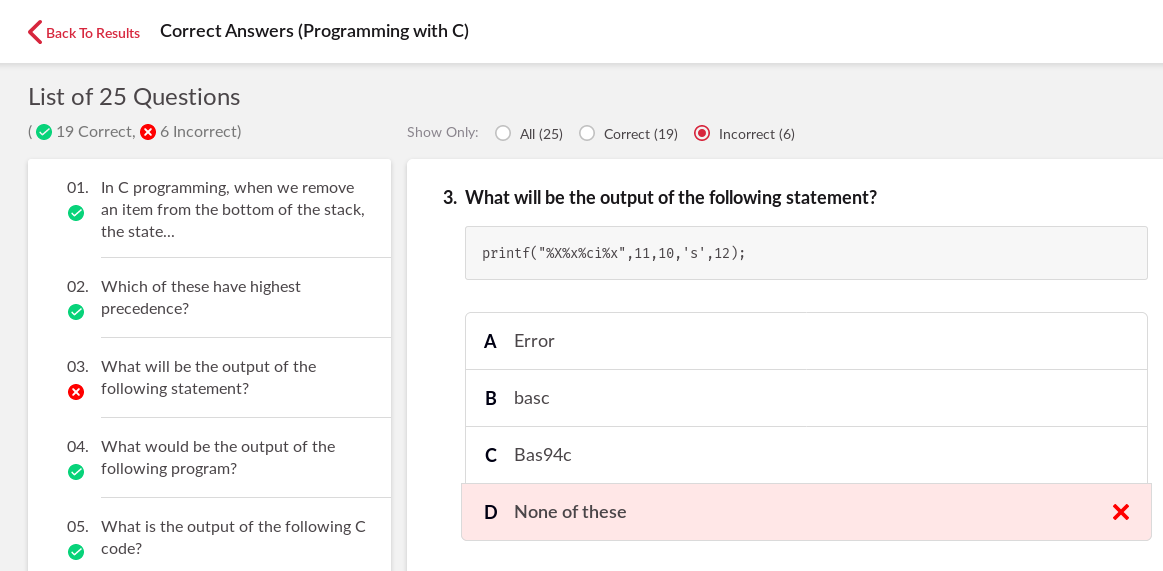
Let's move on to the wrong answers now. I got this wrong apparently:


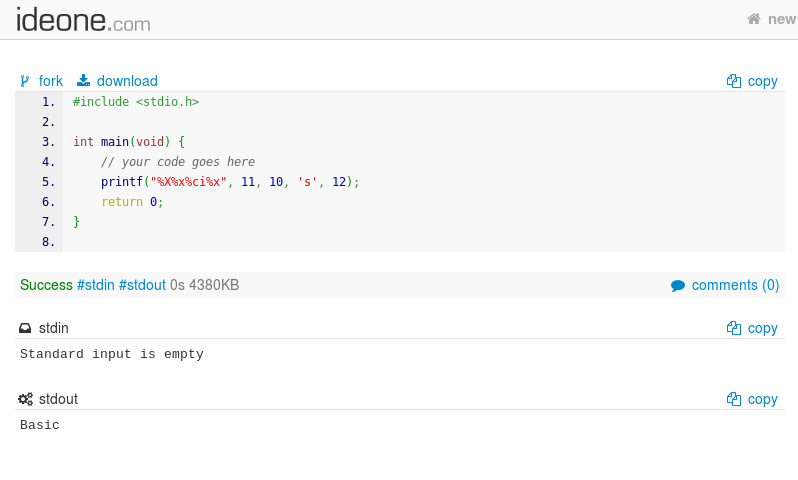
Well, I do pride myself in such questions, but seems like I have forgotten how printf handles the parse string! Well, what does ideone think?


Dear! O Dear! Ideone might have got it wrong too! Wait, maybe TechGig was wrong? Dare I say that!

Let's move to the next incorrect answer by me. Here we go:


Well, well, well. Seems like I've forgotten the basics of pointers! :( What does ideone think then ?


I think I've caught on by this point. I'm quite a C n00b also. Shall we see the next incorrect answer by me ?


This was quite tricky, so it's possible I might have messed up here. But really ?


By this point I'm convinced that the compiler used by ideone is perhaps broken. Or maybe it's TechGig that sucks?

I'll leave it to you, the reader to figure that out.

Sunday, December 23, 2018

Open numbers in whatsapp without saving as contact

Whatsapp Number Opener

Say you want to make a whatsapp conversation with someone for temporary purposes but in order to do that you need to add that person as a contact first. Now adding someone as a contact is by itself a security risk as you can potentially expose your display picture and status to that person. If this is someone with whom you are involved in a transaction, then you'd not want to save this contact just for one time communication. Well, then what is the solution? How do you text this person without saving their number first?

Sunday, August 5, 2018

Multi-protocol Google Talk, Facebook Messenger on Pidgin with App passwords

With the new control in privacy across the social media websites, multi-protocol chat clients like Pidgin have had some tough times. This post aims to solve the problem with tools from this new era of the privacy conscious Web. For those who are unaware, Pidgin, is a chat client which aggregates most social media protocols like XMPP (Gtalk), Jabber, Facebook, ICQ, IRC, into one compact interface.


We'll go through this blog, the process to add app-passwords in Google and Facebook so that it works with Pidgin.

Google Talk App Password Generation:

Sign in here: https://myaccount.google.com/apppasswords

Step 1, select the app


Step 2: Use Other (custom name)


Step 3: Give a name,  I already have pidgin, so used this, for you, use "Pidgin" and click on generate.

Step 4: After generating you will get this window, copy the app password

Step 5: Use the generated password in Pidgin with your Gmail username as usual.

Now for Facebook App password generation.


Step 1: Open facebook settings


Step 2: Go to security and Login


Step 3: Scroll down to App Passwords under Two-factor Authentication and click on generate an App Password


Step 4: Apply similar steps and use a name for this after entering your password for additional authentication, if any.


Step 5: Use the generated password in Facebook app in pidgin.

Enjoy!


Tuesday, May 22, 2018

Clipboard Manager for Windows - Ditto

After my post on Clipboard Management here, which was basically clipboard managers on Linux and Unix-ly operating systems, here's one on Windows.

This cheeky sounding software is named Ditto and is a blessing for all Windows Users.

 Here's a screenshot:


So what this does, is keep track of your last copied items! Works with images as well.

Download ditto from here or from the Ditto Project page: https://ditto-cp.sourceforge.io/

Enjoy!

Sunday, May 20, 2018

ConEmu - A better windows command prompt

So this is a little article and a software review for one of my indispensable Windows Utilities, that is still relevant in the Windows 10 world - ConEmu. The terminal emulator, which is a large improvement over the Windows CMD, is a must have utility for anyone working on (or stuck on) any of the Microsoft Windows based operating systems. Whats even better, is that, this is Open Source.

So if you are looking for an alternate command prompt, take a look here:


Cool features include, multiple tabs, configurable history and of course the animation when it opens or closes!

For more screenshots go here. 

To download a binary go to the website: https://conemu.github.io/en/Downloads.html


Friday, July 7, 2017

Logging PF Firewall on Mac OSX

Steps to enable logging for pfctl utility on newer osx like Yosemite, Sierra:

Firstly,

Add "log" to all rules in "/etc/pf.conf" or which ever PF configuration file you have.

Also set the logging interface with:

set loginterface pflog0

on the top of the PF config file.

Create a virtual interface with:

sudo ifconfig pflog0 create

Now start viewing packets which match the rules you logged with this:

sudo /usr/sbin/tcpdump -lnettti pflog0

At the end do:

sudo ifconfig pflog0 create

Monday, June 26, 2017

Fast download with Golang

Hey all, people keep saying about how great the concurrency is in golang. To be honest, I am pretty much a novice in this.

So just wrote a download accelerator in golang using it's much awesome parallel feature, the source of which can be found here: https://github.com/rghose/go-parallel-downloader

Here are a few results:

URL DownloadedTime taken by wgetTime taken by Golang
http://get.videolan.org/vlc/2.2.5.1/macosx/vlc-2.2.5.1.dmg1m3.375s0m26.609s

This was with GOMAXPROCS=2, threads = 5  with Chunk Size = 10 KB

So well, the chunk size of download did make a lot of difference, since the number of connections to download the thing would decrease, too many connections does not help in speed up


Monday, May 15, 2017

ADB Disable bluetooth on non-rooted devices

Here's a script to disable Bluetooth from non-rooted devices:

adb shell <<__eof
  input keyevent KEYCODE_WAKEUP;
  wm dismiss-keyguard;
  am start -a android.bluetooth.adapter.action.REQUEST_DISABLE;
  is_open=`dumpsys window windows | grep -E 'mCurrentFocus|mFocusedApp' | grep 'com.android.settings/com.android.settings.bluetooth.RequestPermissionHelperActivity'|wc -l`
  if [ $is_open = 0 ]; then exit; fi
  sleep 1;
  input keyevent KEYCODE_DPAD_RIGHT;
  input keyevent KEYCODE_DPAD_RIGHT;
  input keyevent KEYCODE_ENTER;
  exit;
__EOF

No warranties!

Thursday, May 11, 2017

Install mp4box on centos

Google behaved rather strangely today when I wanted to see how to install "Mp4Box". Yum search gave naught, so I decided to google this. On the hindsight maybe I needed better yum search fu for this.

As I was searching through the ways of installing MP4Box on Fedora / Centos I came up with installation instructions that asked me to build the application from source. Even the official website:  https://gpac.wp.imt.fr/mp4box/ provides no explanation on how to do it. They just have the official windows, debian and ios installers. It also offers an explanation to build from source on other linux-es.

While all this confusion is going round, the dude who had the requirement to simple and install gpac, since that is the name of the project! Well, guess what, it worked. So, here's how you install MP4Box on Fedora or CentOS :

Friday, April 28, 2017

RVM Ruby Execution with launchctl on osx

This addresses a problem that goes like this:

You want to create a launch file for launchd (launchctl) to run a ruby file periodically or as a daemon.

Various solutions to this problem include creating an RVM alias for the particular ruby version you want to use. Here I present a working version without aliases, just uses the default RVM Ruby. Please not that, for me, the default rvm ruby is 2.2.5.

When you create a sample plist file like this:


The rvm environment does get initialized. You get lots of gem issues.

The trick here lies in not running ruby but:

rvm-shebang-ruby

Simply use:

Ruby and RVM environments are now correctly updated.

Yeah and you don't need to create any aliases. It will work perfectly fine.


Wednesday, December 7, 2016

Makkhichoose attempts to bring flights search

For a few days I noticed "hello from flights js" on my browser console. I would assume some rougue extension somewhere and ignored it to the point where it really got very annoying. I finally tracked down the extension to this: "gllmlkidgbagkcikijiljllpdloelocn"

To get the folder location of chrome extensions, according to this answer, I first checked out, chrome://version/ for my Profile Path.


I was able to track this down to being the Makkhichoose extension which I regularly use for tracking prices on various e-commerce websites, like amazon, paytm, shopclues, myntra and flipkart.

Okay... A moment of silence for me and my covert stinginess.

Now then that is over, we can proceed further. So apparently MakkhiChoose is trying out a new flights based comparison tool as well!

Here are a few samples:
console.log('hello from flights js');
// var mmt_domestic_page__previous_url='';
// function mmt_domestic_page_url_watcher(){

And for cleartrip as well:

//cleartrip parsing

var ct_domestic_page_load_checker_timer;

function ct_domestic_page_load_checker(){
console.log('executing load_checker');
var url_params=window.location.search.replace('?','').split('&').reduce(function(s,c){var t=c.split('=');s[t[0]]=t[1];return s;},{});
if( (url_params['page']=='loaded' && window.location.href.match('cleartrip.com/flights/results?') && ($('.loaderContainer:eq(-1)').css('display')=="none"))  ){
console.log(window.location.href);

 Also http://www.easemytrip.in/

      url: "http://emtxml.bookeasytrip.com/emtxml.asmx",
      processData: false,
      // url: "http://shades.makkhichoose.com/analytics/logextensionfeedback",
      data: xml_req,
      contentType: "application/soap+xml",


Seems like they are on to something!

In my bout of hacking their sources, I found a neat "What-is-my-IP" clone. Here it is:

curl "http://search.makkhichoose.com/getip"
Happy hacking!


Monday, December 5, 2016

Selenium ChromeDriver Install Script

Hello Folks,


As I was trying to instruct someone how to install Selenium Webdriver on OSX, I realised that there were no good scripts to automate this task. There were instructions, sure, but none of the were a copy and paste solution. Not that I encourage copy-paste, I found this rather inconvenient though.

So here's a script install selenium chromedriver for any unix osx or windows computers (assuming cygwin) -

In case, the github plugin did not work the URL is here:

https://gist.github.com/rghose/106ae71639c6f9ce9076a260a5614b94

Enjoy!

Thursday, November 24, 2016

Showing Images on the terminal

So I just found a post on Hacker News where someone installed FreeBSD on their Mac, apparently because of this cool terminal thingy called Terminology. It can apparently show images on the terminal, using something called the EFL (Enlightenment Foundation Libraries), which are basically a  set of graphics libraries on the Enlightenment Window Manager. Now being the lazy dude I am, I decided I am not going to spend hacking UEFI today, rather why not spend hacking iTerm instead? I know iTerm shows me beer emoji when I do brew installs.


So surely, there must be some way of showing images right?

Well here we go:


Right on! Here's the amazing script which does this: https://raw.githubusercontent.com/gnachman/iTerm2/master/tests/imgcat

Happy Hacking!

Friday, January 8, 2016

One line youtube video downloader

Okay, so this might be illegal in certain places. I just decided to try this out for fun, and here we have it, download youtube videos with 1 line of shell script (and some perl)

The script looks like this:
curl -H 'Upgrade-insecure-requests: 1' -H 'Cache-control: max-age=0' -H 'Accept-language: en-US,en;q=0.8,bn;q=0.6' -H 'Accept-encoding: gzip, deflate, sdch' -H 'Accept: text/html,application/xhtml+xml,application/xml;q=0.9,image/webp,*/*;q=0.8' -H 'User-Agent: Mozilla/5.0 (Macintosh; Intel Mac OS X 10_11_1) AppleWebKit/537.36 (KHTML, like Gecko) Chrome/47.0.2526.106 Safari/537.36' "https://www.youtube.com/watch?v=II3L1noJlYQ" | gunzip | egrep -o 'https%3A%2F%2F[^\.]*\.googlevideo.com%2F[^,\]*' | perl -pe 's/\%(\w\w)/chr hex $1/ge' | head -n1  | xargs wget -O out.video
One line.

Get it here:

Thursday, October 29, 2015

Free SQL Query tool for SQL Server

I found this rather nifty tool: dBeaver which is pretty awesome for database queries, an alternative to RazorSql which the folks at my company used. Now, RazorSQL is not free and requires a license after the trial period ends, so I kept searching for an alternative which works. After fiddling around with thing like Squirrel and the likes, dBeaver impressed me majorly.

The tool is Eclipse based, so a bit slow to startup but apart from that, the software kicks ass!

Here's a few screenshots:


Hope you find this useful :)

Sunday, November 16, 2014

Removing CLOSE_WAIT connections

Hello folks, just thought I would share something I came with during one fine day at work.

Recently, we faced a problem where there were a lot of CLOSE_WAIT connections on our server which caused a variety of issues on the server. It seemed like there was a bug in the application (a java based app) but hunting it down was a pain, fixing it would also take a long time. Instead what we did, was to restart the application at periodic intervals which seemed to clean up the CLOSE_WAIT connections.

However, we wanted to remove CLOSE_WAIT connections without killing the process. We found that we could do the same with tools like :
We tried them out but none of them seemed to be of much use for CLOSE_WAIT connections. So I hacked into the source code of killcx and found this interesting bit of code:
my $packet = Net::RawIP->new({
      ip => {  frag_off => 0, tos => 0,
               saddr => $dest_ip, daddr => $local_ip
            },
      tcp =>{  dest => $local_port, source => $dest_port,
               seq => 10, syn => 1
            }
   });
   $packet->send;
I modified this and wrote this utility that removes all CLOSE_WAIT connections: https://github.com/rghose/kill-close-wait-connections

This seemed to do the trick! Happy hacking.

Sunday, November 2, 2014

Identifying the actor

So, here I am at Candies, Bandra looking at an all too familiar Bollywood actor, who was also a customer there. He played the villain or cop in many movies, I know him. He had his son with him as well. They bear an uncanny resemblance. I want to go up there and get a picture clicked with him. Wait, what was his name?

I asked my friend who was with me, he too seemed clueless. He also wanted to get a picture clicked, but what if he asked his name? We were terrified of that prospect, as we saw a young woman probably in her 30s, go up to him and click one herself. Damn. Shes knows his name for sure.

In our dilemma and brain racking to recollect his name, he was done with his buying and he left. Leaving me pondering over this problem of his identity. So I came home and tried searching Google, assuming it will read my brainwaves. No use. I could not find a Bollywood actor who visited Candies often, he was not a very well known figure like say, Shahrukh Khan for instance, but he was pretty well known. Now I decided to do this: http://en.wikipedia.org/wiki/List_of_Indian_film_actors!

Again, there were too many! So I made these:

a) Python script to get the images from an infobox element in a page here.
b) Shell script to automate this here.

Armed with these tools, I did this:
# wget http://en.wikipedia.org/wiki/List_of_Indian_film_actors
# grep '<li><a href=' List_of_Indian_film_actors | grep 'title' > list
Deleted the last irrelevant line and fired up "./parse_names.sh list"

I made myself some coffee, came back to my laptop and casually started browsing the thumbnails from my file manager. Found him!